01 / Before you buy
Start at the wall, not the app.
These choices cover the specified North American supply voltages around 120 V. They are not for 230 V installations. Check the exact regional model, voltage, wall-box dimensions and local installation requirements.
Circuit & neutral
One switch controlling the light is single-pole. Two or more is multi-way. KS225 and S505 need a neutral; Inovelli’s non-neutral and multi-way options have extra conditions.
On/off or dimming
Choose S505 for on/off. For dimming, check the bulb type, dimming method and total load against the exact dimmer’s limits. A dimmer is not a universal fan or motor control.
Wi-Fi or Thread
Kasa and Tapo use 2.4 GHz Wi-Fi. Inovelli White uses Thread. Matter controller requirements depend on your platform; a Thread border router and a Matter controller have different jobs.
02 / Find your fit
Three choices. Different requirements.
Compare the model and pack as carefully as the features. These are source-based recommendations; we have not performed hands-on reliability testing.
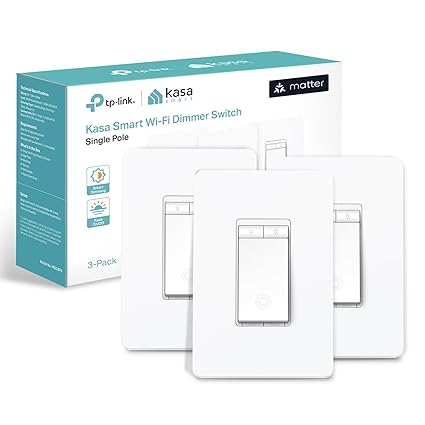
Wi-Fi dimming · neutral required
Kasa KS225
A single-pole dimmer for compatible dimmable lighting, with physical brightness-up and brightness-down buttons.
- Circuit
- Single-pole only · neutral required
- Power
- 120 V AC · 60 Hz
- Control & connection
- Dimming · 2.4 GHz Wi-Fi
- Linked offer
- Amazon: KS225P3 · 3-pack
What you need
- Compatible TRIAC-dimmable bulbs: up to 150 W LED or 300 W incandescent/halogen. Check the bulb and dimmer specifications together.
- A 2.4 GHz Wi-Fi network and your platform’s Matter setup requirements. Bluetooth is for setup.
Check before choosing
Not a 3-way dimmer. The linked Amazon listing is a three-pack, not a single switch. Confirm wall-box space and your exact lighting load before buying.
Amazon: KS225P3 · 3-pack
Check price at Amazon · 3-packConfirm model, pack, included accessories and current terms at the retailer.
View catalog record →
Simple on/off · neutral required
Tapo S505
An on/off switch for a single-pole circuit when you do not need to adjust brightness at the wall.
- Circuit
- Single-pole only · neutral required
- Power
- 100–120 V AC · 50/60 Hz
- Control & connection
- On/off · 2.4 GHz Wi-Fi
- Linked offer
- Amazon: S505 · 1 switch
What you need
- Check the manufacturer’s load limits for the connected equipment; on/off switching does not add dimming.
- A 2.4 GHz Wi-Fi network and your platform’s Matter setup requirements. Bluetooth is for setup.
Check before choosing
S505 is different from the S505D dimmer. It is not compatible with wired 3-way circuits; optional Tapo wireless-button automations require additional Tapo hardware.
Amazon: S505 · 1 switch
Check price at Amazon · 1 switchConfirm model, pack, included accessories and current terms at the retailer.
View catalog record →
Thread dimming · more wiring options
Inovelli White VTM31-SN
A Matter-over-Thread dimmer with an LED notification bar. Consider it when your installation needs the manufacturer’s supported multi-way or non-neutral configuration.
- Circuit
- Single-pole or supported multi-way
- Power
- 120 V AC · 60 Hz
- Control & connection
- Dimming / on-off · Thread
- Linked offer
- Amazon: VTM31-SN · 1 switch
What you need
- A compatible Matter controller and Thread border router. Advanced scenes and notifications depend on the platform.
- Non-neutral installations need configuration-specific checks. Budget for a bypass; non-neutral multi-way needs an Inovelli Aux switch. Confirm the current manual before purchase.
Check before choosing
White is the Matter/Thread series; Blue is Zigbee. VTM31-SN is for supported lighting loads, not fans, outlets, motors or transformer-fed loads. Check dimmable-bulb compatibility, load limits and multi-gang derating.
Amazon: VTM31-SN · 1 switch
Check price at Amazon · 1 switchConfirm model, pack, included accessories and current terms at the retailer.
View catalog record →Matter smart switch FAQ
Can I replace a 3-way switch with the KS225 or S505?
No. Both are single-pole models. If two wall switches control the same light, check a manufacturer-supported multi-way model and its exact configuration. A wireless button automation is different from wired 3-way compatibility.
Can a Matter switch work without a neutral wire?
Some can. The Inovelli White VTM31-SN supports specified non-neutral configurations, with additional requirements such as a bypass or Aux switch. KS225 and S505 require a neutral. Have a qualified installer confirm your circuit and the current manufacturer instructions.
Do Wi-Fi switches need a Thread border router?
No. KS225 and S505 use Wi-Fi; Bluetooth is used for setup. Matter integration still follows your chosen platform’s controller requirements. The Inovelli White model uses Thread and requires compatible Thread infrastructure.
Is Inovelli Blue the same as White?
No. White VTM31-SN is the Matter-over-Thread dimmer considered here. Blue uses Zigbee. Similar looks, an LED bar or a generic retailer title are not enough to establish the model.
Will any bulb work with a smart dimmer?
No. Match the bulb or fixture’s dimming method and electrical load to the exact dimmer. Smart bulbs may need a separately supported smart-bulb mode; do not assume a conventional dimmer can safely dim them.
Other models considered
These models need additional variant or installation checks before we can recommend a matching offer.
Meross in-wall switch
A behind-the-switch module is different from a replacement wall switch. The previous retailer mapping mixes identities; we have not established an exact Matter model and offer for this recommendation.
SONOFF M5 Matter
M5 Matter uses physical buttons. Gang count and wall-box format matter: the checked Amazon offer is a 2-gang, 120-type version. That is not a general substitute for the US single-pole models above.
Manufacturer details ↗Square D X Series
The checked retailer title identifies a Matter on/off switch, but this guide has not completed the exact manufacturer model, installation and offer match. X Series is a range, not one interchangeable device.
MOES Matter switch
The checked Amazon offer is a 2-gang glass-touch switch; the existing manufacturer destination describes a button switch. Those variants need separate matching before a recommendation.
Manufacturer details ↗How this guide was prepared
We reviewed manufacturer specifications and manuals and matched the three linked US Amazon listings to the model and pack shown here on September 16, 2026. The exact Inovelli Single / New / White manufacturer variant and package were checked on September 19, 2026 and added as a direct non-affiliate option. Amazon listings were not rechecked in that update. Retailer pages can change; confirm your selection before buying. This is not a lab test or an exhaustive ranking.
This guide uses “Check price” links instead of unverified prices, stock or discount claims. A consumer model, regional version, multipack and CSA certification record are different things; a similar name does not make them interchangeable. Read our editorial policy.